Open Business › Sales › Invoice from Time, select the client, choose how to charge and describe the time, tick the timesheet entries and click Create Invoice. Exacc makes a draft invoice and links the entries to it, so the same time is never billed twice.
Before you start
- Timesheet entries recorded against the client.
- Hourly rates on the users who did the work, if you charge at current rates.
1. Select the client
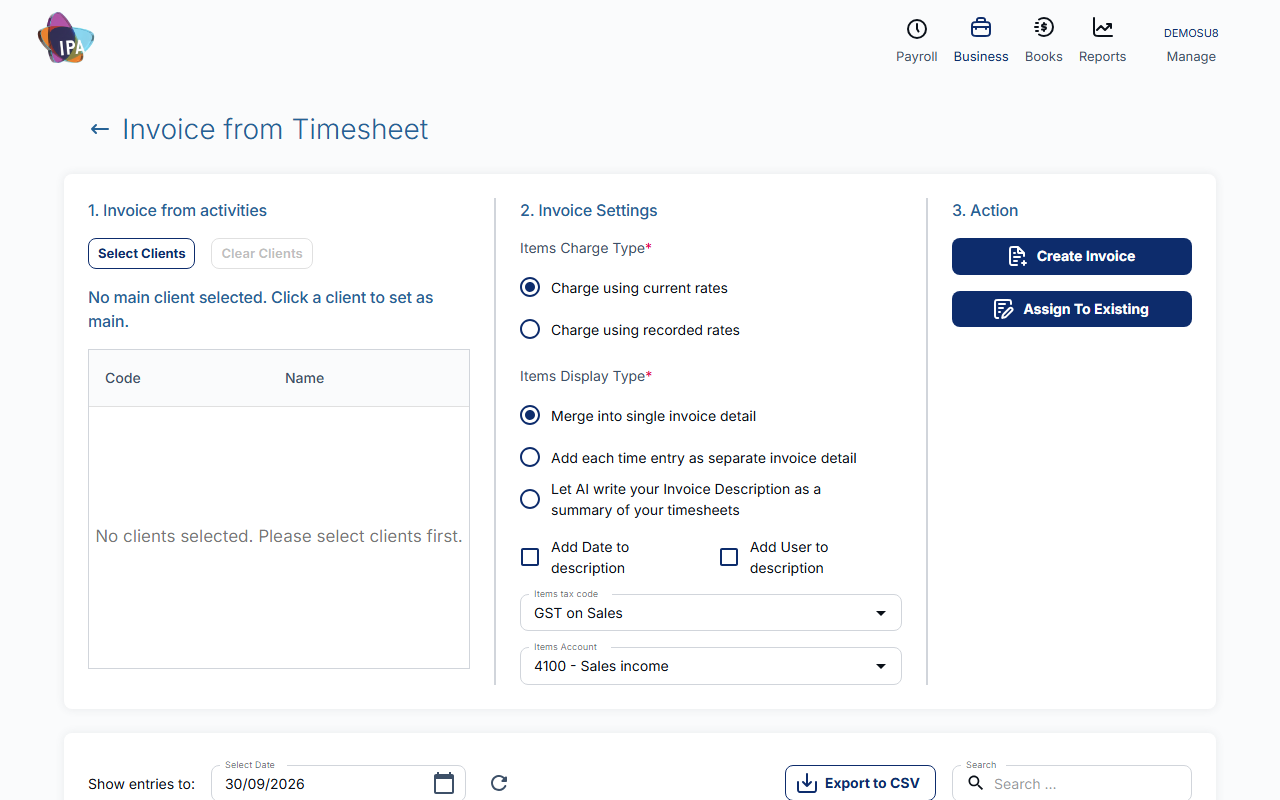
Click Select Clients, tick one or more and click Confirm Selection. The first one becomes the main client, the one the invoice is addressed to; click another in the list to change it. Time from every selected client goes on that one invoice.
2. Choose the invoice settings
- Items Charge Type (required) - Charge using current rates (time × the person's hourly rate now) or Charge using recorded rates (the charge saved on each entry).
- Items Display Type (required) - Merge into single invoice detail (one line listing all descriptions), Add each time entry as separate invoice detail, or Let AI write your Invoice Description as a summary of your timesheets.
- Add Date / Add User to description - put the date and the person on each line.
- Items tax code, Items Account (required) - the tax code and income account for the lines.
3. Select the entries
The grid shows the client's entries that are not on an invoice yet, up to the date in Show entries to: (today by default). Tick the ones to bill; the footer shows how many and the total charge.
4. Create the invoice
Click Create Invoice. Exacc creates a draft invoice dated today with you as sales person and opens it. Check it, then click Update & Finalize and send it as usual.
Already have an invoice for this work? Assign To Existing links the selected entries to an invoice you pick, without changing its lines or total.
Billed by mistake?
Deleting the invoice frees its timesheet entries so you can invoice them again.
Finding unbilled time
Reports › All reports has Timesheets not invoiced and Uninvoiced timesheet, and Invoices from Timesheet lists invoices with time attached.
Related guides
Checked against Exacc on 29 September 2026. Machine-readable version