Open Payroll › Activity Types and click New Activity Type: Name, Code, Base Category, Fee Factor and Cost Factor for charging, and the Payroll Item that pays employees for this time. Save.
1. Add an activity type
Open Payroll › Activity Types and click New Activity Type:
- Name and Code (required) - e.g. Bookkeeping, BK.
- Base Category (required) - how the charge is worked out: an hourly rate, a fixed fee per hour, a flat fee, or not charged.
- Fee Factor and Cost Factor - multipliers on the rate for charging and for cost.
- Payroll Item - the ordinary pay item that pays employees for this time. Without it, pay events from timesheets stop with "Check Activity Types settings - missing links to Payroll".
- Notes and Active - your notes; untick Active to stop offering it.
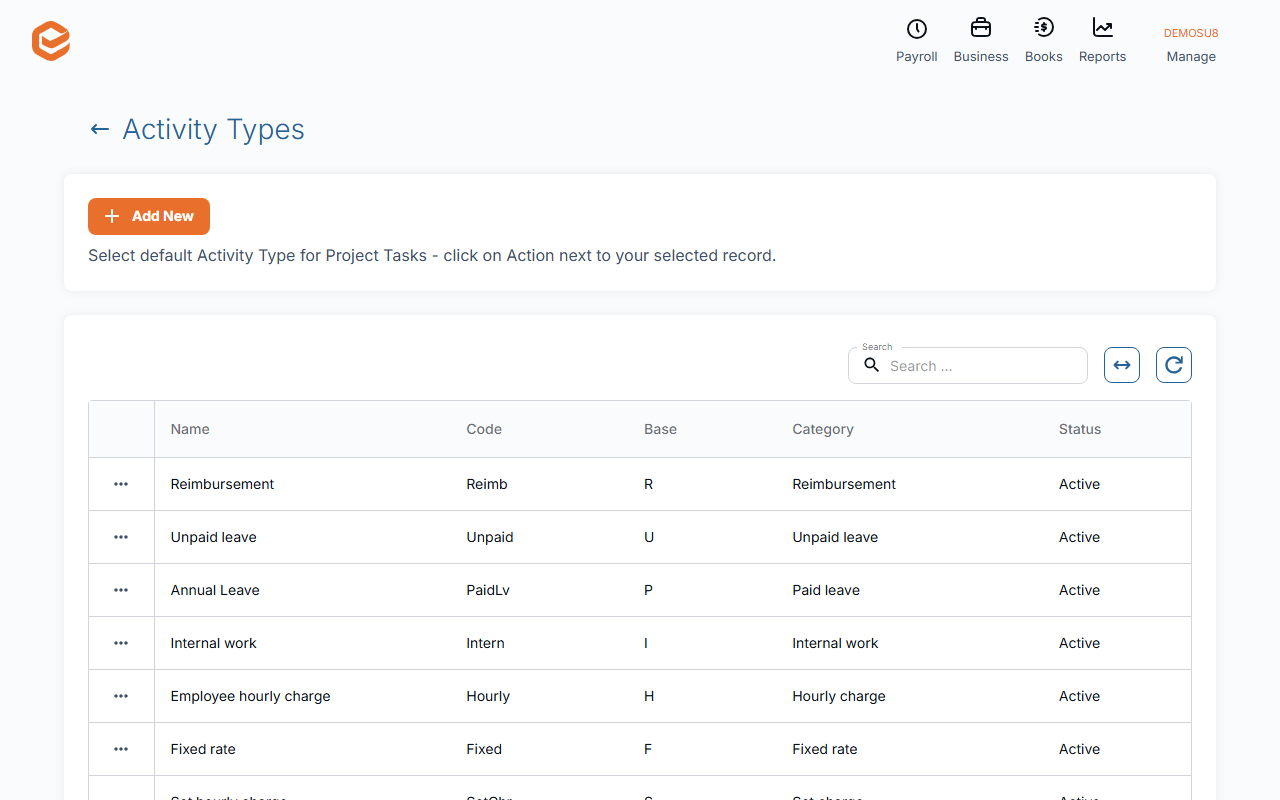
2. Manage them
A row's menu has Edit, Deactivate / Activate, Mark as Default for Tasks and Delete. An activity type with timesheets cannot be deleted; deactivate it instead.
Related guides
Checked against Exacc on 9 October 2026. Machine-readable version