Open Reports: the reports are grouped in tabs (Accounting, Payroll, Sales, Bills, Timesheet), each with a one-line description. Search finds a report by name or description. Click one to open it; Go to reports brings you back to the same tab.
1. Open Reports
Click Reports in the top menu. The Accounting tab opens first. You see only the reports your user can open.
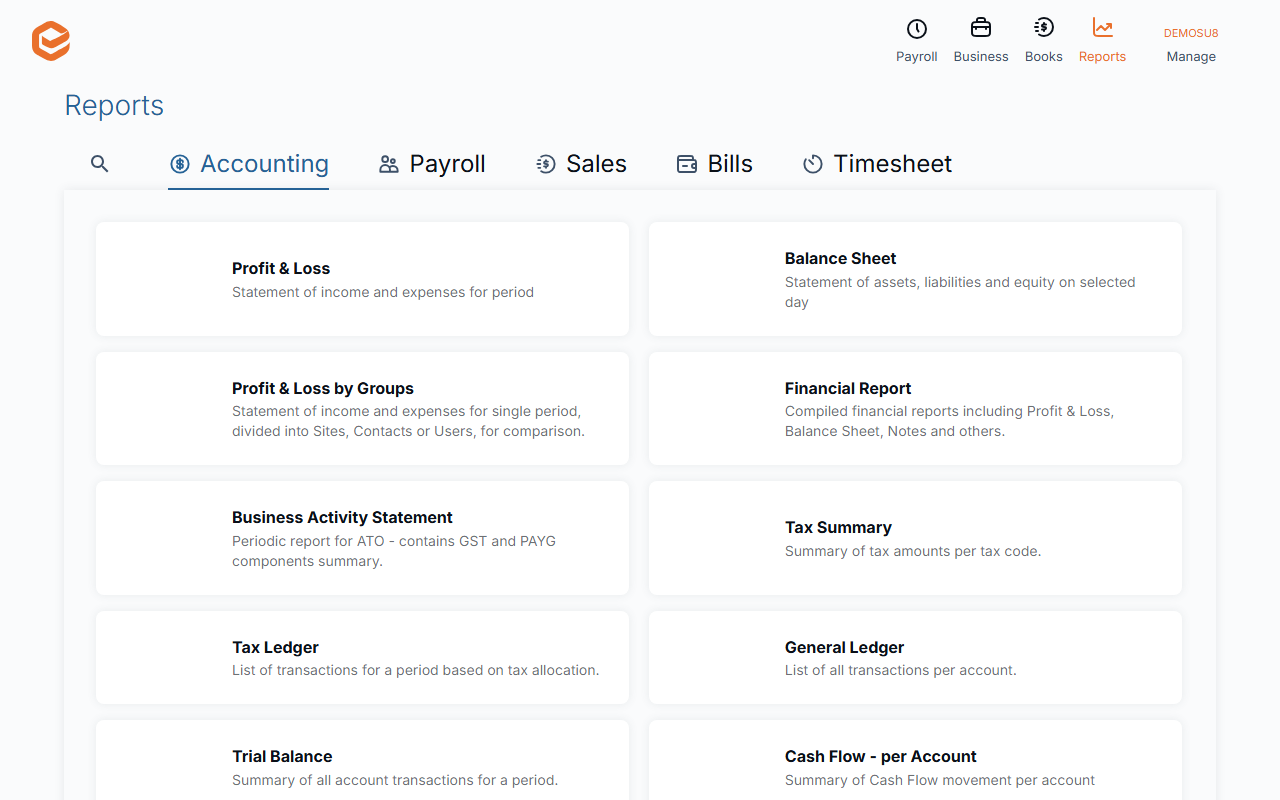
2. Pick a tab, or search
The search tab (magnifier) finds a report by words in its name or description. The tabs hold:
- Accounting - Profit & Loss, Balance Sheet, Profit & Loss by Groups, Financial Report, Business Activity Statement, Tax Summary, Tax Ledger, General Ledger, Trial Balance, Cash Flow (per account and summary), Daily Account Balances, Journals per Account, Transactions List per Site, Assets List, Finance calculator, Activity Statements List.
- Payroll - Employee Pay Summary, Employee history, Pay Events List, leave history and requests, pay details, Employees by Superfund, Termination calcs.
- Sales - Receivables Summary and details, Customer history, Invoices List, Payments History, recurring invoices and projects, sent e-mails.
- Bills - Payables summary, Supplier History, Bills List.
- Timesheet - summaries and analysis, records list, timesheets not invoiced or marked for attention.
3. Open and run it
Click a report. Most open with their filters first: set them and click Apply filters (see Filter a report). Click Go to reports to come back to the same tab.
Not available
Reports cannot be scheduled or emailed automatically, shared by link, or saved as favourites. Export a report and send the file (see Export a report).
Related guides
Checked against Exacc on 9 October 2026. Machine-readable version