Open Reports › Balance Sheet, set the Date, choose whether to Compare this period with earlier dates (Comparison span: weeks to years), and show the report. Click a balance to see its transactions from the start of the financial year. Export to CSV or PDF.
1. Choose the date
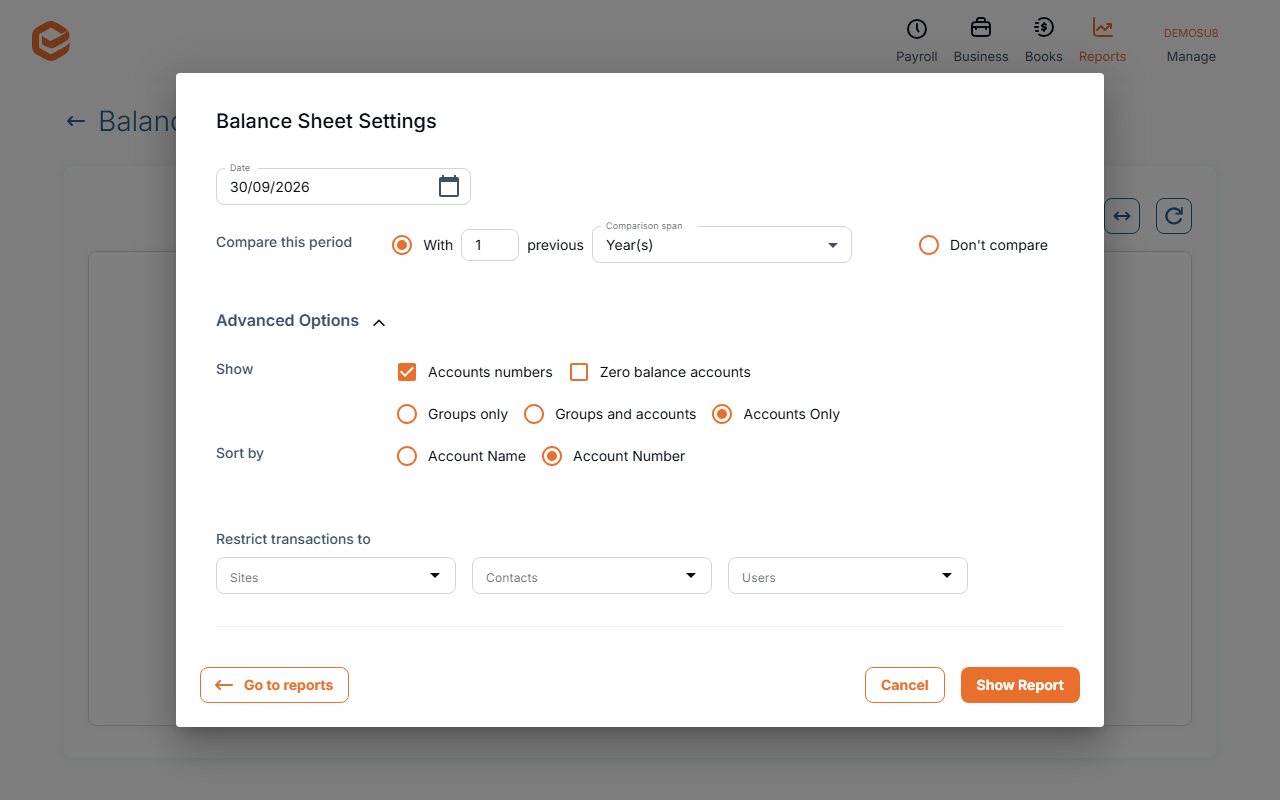
Open Reports › Balance Sheet. In Balance Sheet Settings set:
- Date (required) - the day to report at.
- Compare this period - With a number of previous dates and a Comparison span (Week(s), Fortnight(s), Month(s), Quarter(s) or Year(s)), or Don't compare.
- Show, Sort by and Restrict transactions to - the same options as the Profit & Loss.
2. Read and drill down
The Balance Sheet shows assets, liabilities and equity as of the date. Click a balance to open the General Ledger for that account from 1 July of that financial year to the date.
3. Export
Export to CSV or PDF from the toolbar.
Cash basis
The Balance Sheet has no cash-method option: it is always on the accruals basis.
Related guides
- Profit & Loss report
- Trial Balance report
- General Ledger and journals reports
- Export a report to Excel or PDF
Checked against Exacc on 9 October 2026. Machine-readable version