Open Business › + Recurring Project, choose the Type and Contact, set Issue every (weeks, months or years) and the Next Execution date, the Project Title and Initial Status, and save. Exacc creates the project overnight on each date and emails you a report.
1. Set it up
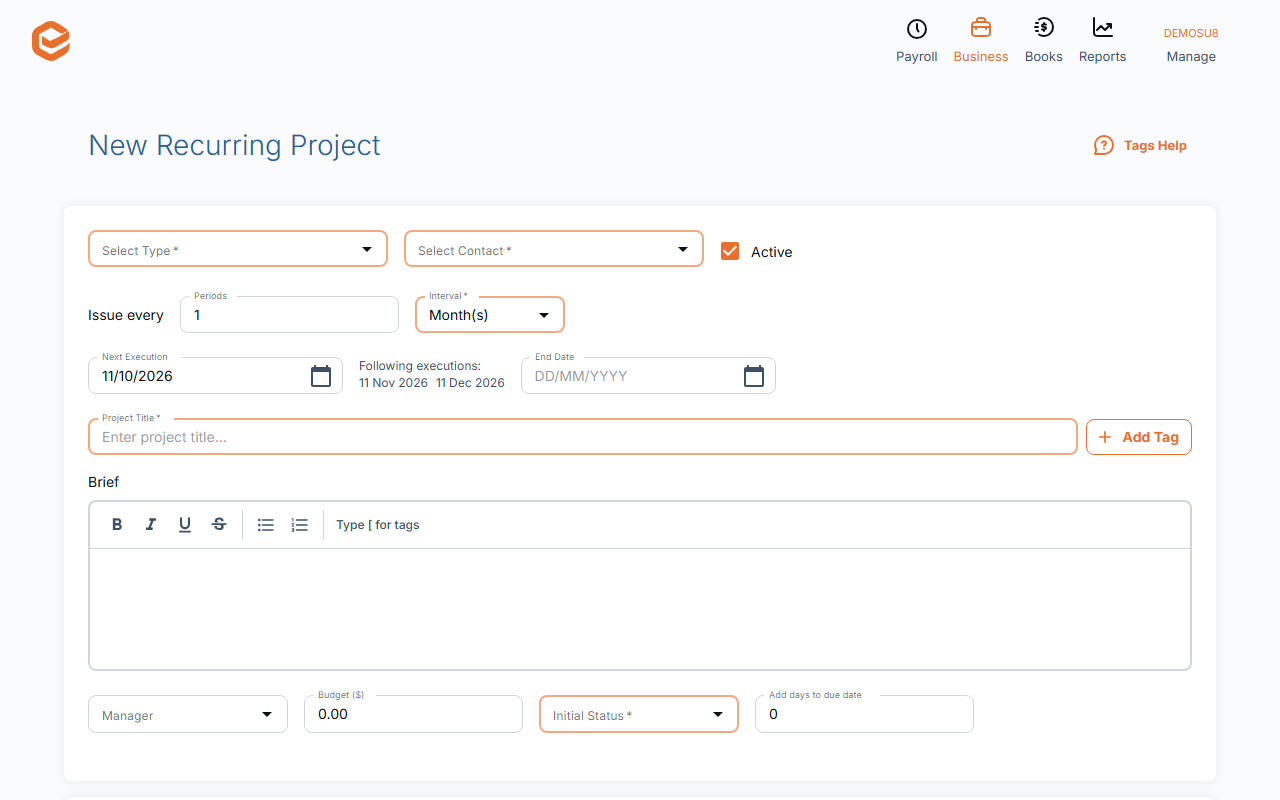
Open Business › + Recurring Project:
- Select Type and Select Contact (required) - the kind of project and the client.
- Issue every (required) - how often: a number of weeks, months or years.
- Next Execution and End Date (required) - the next creation date (the following ones are listed) and an optional last date.
- Project Title, Brief, Manager, Budget (required) - what each new project gets.
- Initial Status and Add days to due date (required) - its status and how long it has.
2. Email the client (optional)
Tick Send e-mail to Contact on creation and write the Subject and E-mail body (Tags Help lists the fields you can insert). A client without a valid email gets no project that day: fix their email.
3. What happens
Each night Exacc creates the projects due that day and emails a "Creating Recurring Projects - report" to you and each manager. If the client has been made inactive, the recurring project stops.
Seeing your recurring projects
Reports › Sales › Recurring Projects lists them.
Related guides
Checked against Exacc on 10 October 2026. Machine-readable version