Open Business › + Project, enter the Name, choose the Client (optional), Type and Manager, set the Status, Priority, Start Date and Due Date and click Create Project. Then add tasks (see Add a task).
Before you start
- Project types and statuses set up (see Project types and statuses).
1. Fill in the project
Open Business › + Project:
- Name (required) - what the project is.
- Client - the customer it is for, or none for internal work.
- Type (required) - the kind of project, e.g. Tax return.
- Status and Priority - where it is up to and how urgent.
- Start Date and Due Date - due is a week from today by default.
- Manager and Assigned To (required) - who is responsible and who does the work (Assign to me for yourself).
- Budget, $ and Brief - a budget figure for your reference, and a short description.
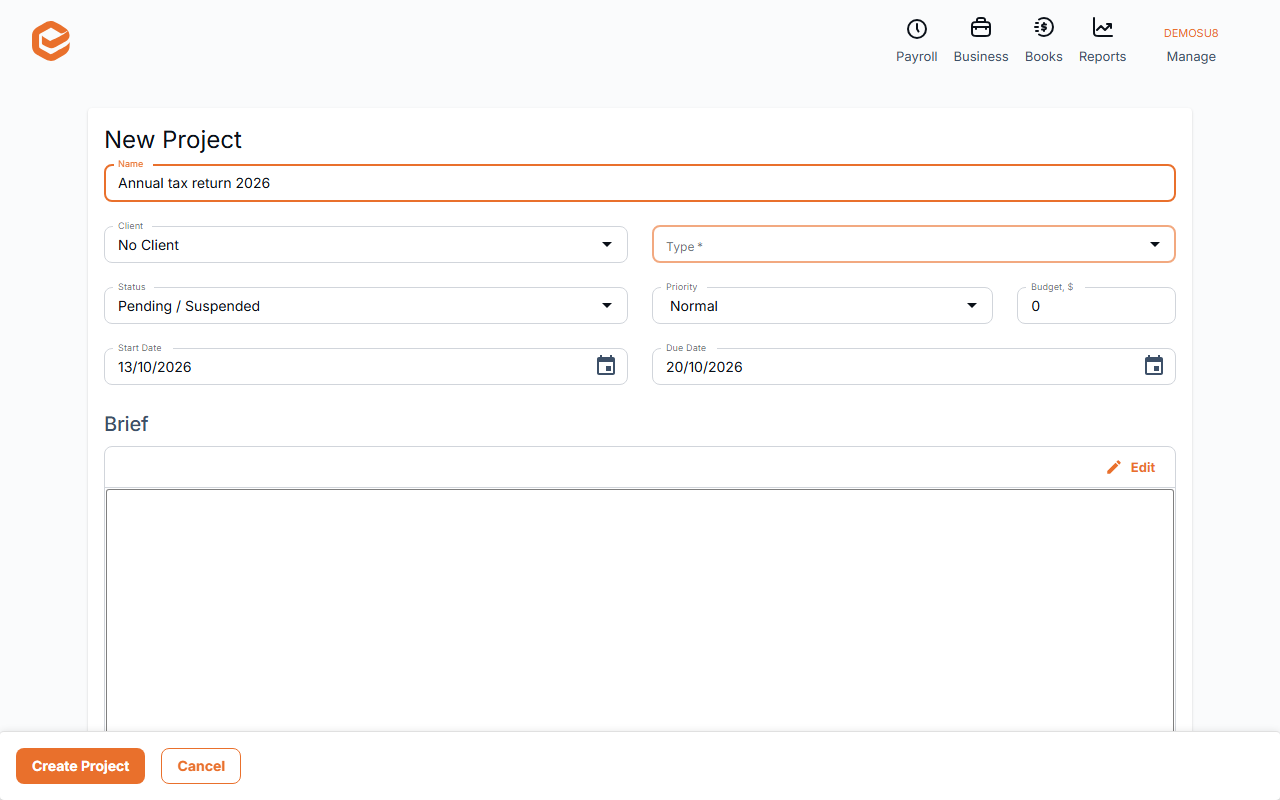
2. Create it
Click Create Project ("Project created successfully"). On the saved project you can add Files and Project notes for the team.
Not available
The budget is a note: Exacc does not compare it with time or costs. There are no milestones, Gantt charts or resource planning.
Related guides
Checked against Exacc on 10 October 2026. Machine-readable version