Open Books › + Bank Transaction, choose Spend Money or Receive Money, the Bank Account and the Date, add a line for each account with its Amount and Tax code, and click Save & Post.
1. Open New Bank Transaction
Open Books › + Bank Transaction. When you code a line from your bank feed, Exacc opens this screen for you with the date and amount filled in.
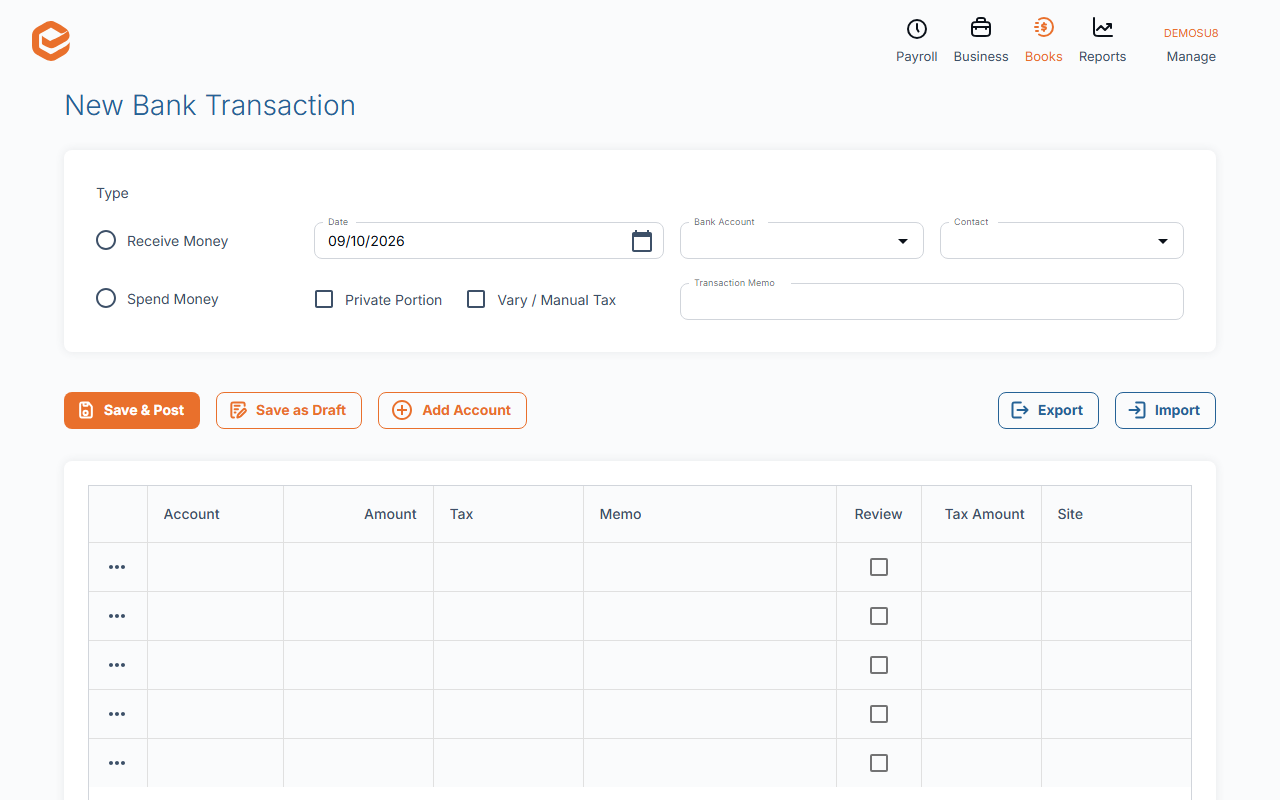
2. Fill in the header
- Type (required) - Spend Money (money out) or Receive Money (money in).
- Date (required) - must be after your Accounts Lock date.
- Bank Account (required) - the account the money went out of or into.
- Contact - who you paid or who paid you.
- Transaction Memo - what it was for.
3. Add the lines
Each line has an Account, an Amount (including GST) and a Tax code. Split one payment over several accounts with more lines. Priv % marks a private part, and Tax Var lets you type the GST yourself.
4. Save
Click Save & Post. The total must be above zero. A transaction made from a bank feed line must add up to that line's amount, and its total cannot be changed later.
It was really an invoice or bill payment
Convert to Payment turns the transaction into a payment against the customer's invoice or the supplier's bill, so it shows as paid.
Related guides
- Code your bank transactions (process feeds)
- Enter a general journal
- Attach receipts and files to transactions
- Record a customer payment
Checked against Exacc on 9 October 2026. Machine-readable version