In Exacc open Business Details › ATO and click Get your SSID. Then log in to the ATO's Access Manager (am.ato.gov.au) with your myID, open My hosted software services, Notify the ATO of your hosted service, find Exacc (ABN 86 643 294 937) and add your SSID as the Software ID. Back in Exacc, click Yes I Did. Agents link their subscriber account once instead.
Before you start
- A myID for the person doing the ATO side, with enough access to the business in Access Manager (the principal authority, an authorisation administrator, or a user allowed to notify hosted software services).
- The business's ABN, ATO branch code, phone and address in Business Details (Exacc warns you if any is missing).
1. Get your SSID in Exacc
Open Manage › Configuration › Business Details and the ATO tab, and click Get your SSID. The SSID (software subscription ID) is the number that tells the ATO this business uses Exacc. The ATO's screens call it a Software ID.
If you already lodge for this business through your practice's subscriber account, Exacc says so and asks before creating a separate link: the business owner then has to give the new SSID to the ATO themselves.
2. Open Access Manager
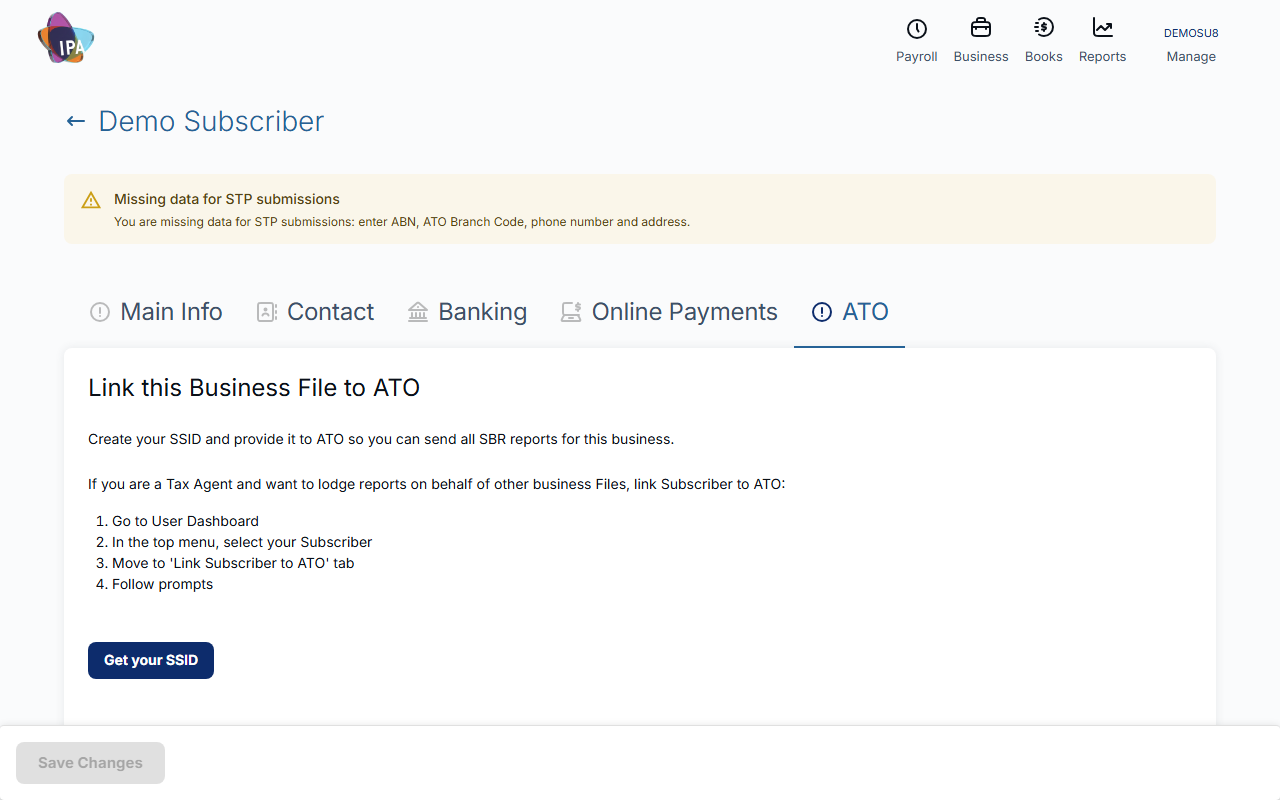
Go to am.ato.gov.au, log in with your myID and choose the business (the same ABN as in Exacc).
On the left, under Access Manager Links, click My hosted software services.
3. Notify the ATO that you use Exacc
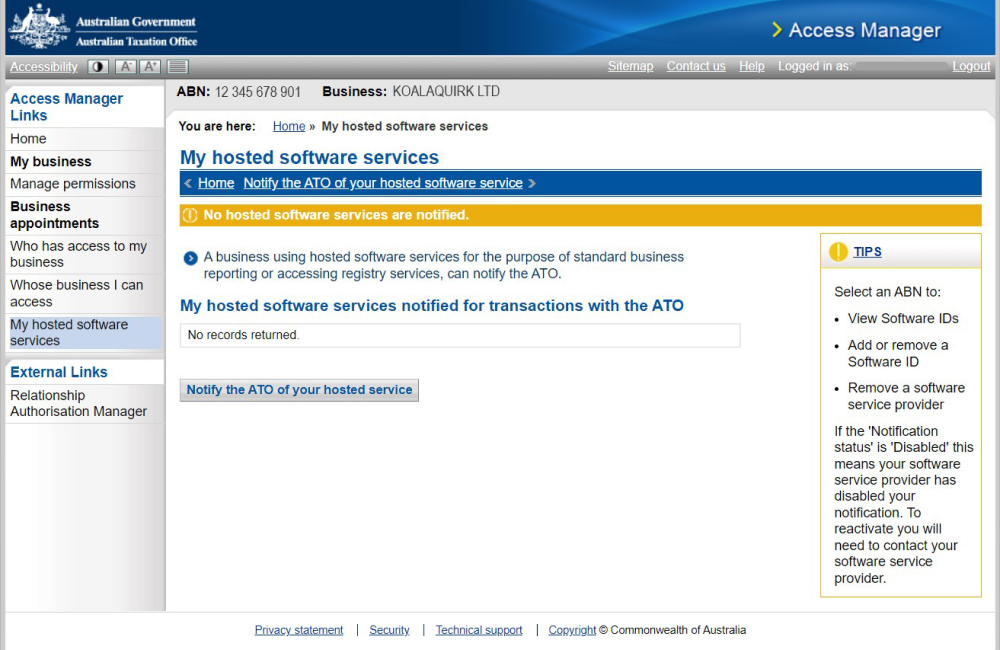
Click Notify the ATO of your hosted service. Search for Exacc's ABN 86643294937 (or the name Exacc) and click the ABN in the result.
4. Add your SSID as the Software ID
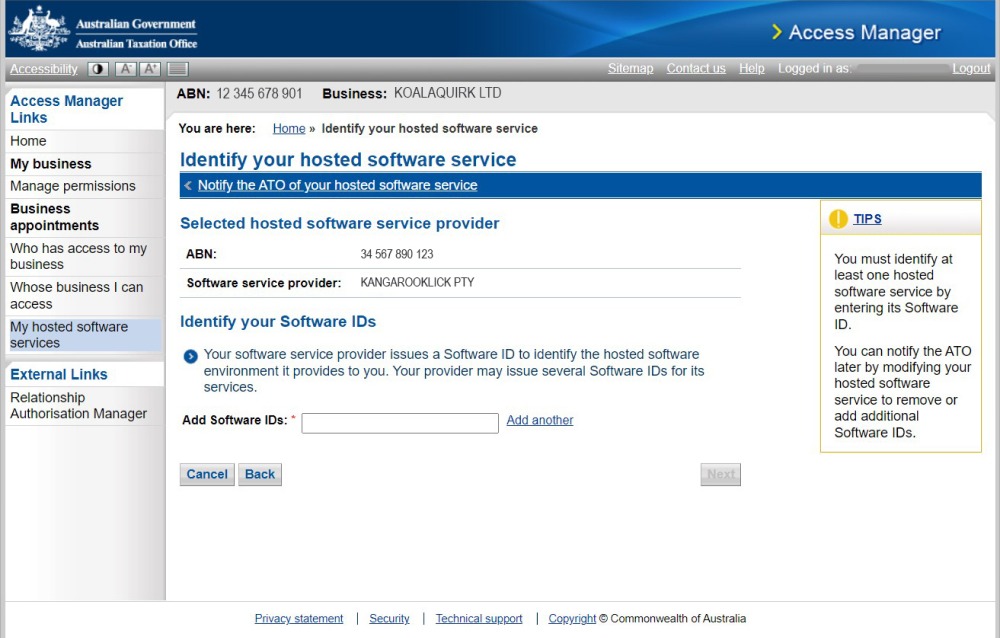
In Add Software IDs enter your SSID, click Next, check the details and click Save. The ATO shows a confirmation.
5. Tell Exacc you did it
Back on the ATO tab, click Yes I Did. The tab then says You are linked to the ATO with your SSID and who linked it. If you got stuck, No, I need help opens this page with your SSID filled in.
Tax and BAS agents: link your subscriber account once
To lodge for client business files, link your practice instead of each client. On your dashboard, choose your subscriber in the top menu and open the Link Subscriber to ATO tab, click Get SSID, do the same Access Manager steps for your practice's ABN, choose I Am A Tax Agent or I Am BAS Agent, and click Yes I Did. The tab then shows who linked it and when.
Members of the subscriber account who are allowed to lodge can then lodge for the business files the subscriber manages, as your agent type. The clients must still be on your ATO client list.
If a lodgement is rejected
Yes I Did only records that you finished the steps; Exacc does not check with the ATO at that point. If the ATO rejects a lodgement for authorisation, log in to Access Manager and check that My hosted software services still lists Exacc with your SSID. Re-add it if it is missing.
To stop lodging through Exacc for a business, click Deactivate link on the ATO tab and remove Exacc in Access Manager.
Questions
Is the SSID the same as the Software ID?
Yes. Exacc calls it your SSID; the ATO's Access Manager asks for a Software ID. Each business file and each subscriber account has its own.
Do I need myGovID?
myGovID is now called myID. Log in to Access Manager with the myID you use for the business.
Related guides
- Update your business details
- Manage your subscriber account and team
- Lodge STP and amend a pay event
- Prepare and lodge your BAS
- Prepare and lodge your TPAR
Checked against Exacc on 10 October 2026. Machine-readable version