Open Reports › All reports, go to the Bills tab and open Payables summary. Choose the As of date and click Apply filters: each supplier's unpaid total, split into Current and overdue bands, with Export to Excel.
1. Open the report and choose the date
Open Reports › All reports › Bills › Payables summary. Choose As of (the date to report at) and click Apply filters.
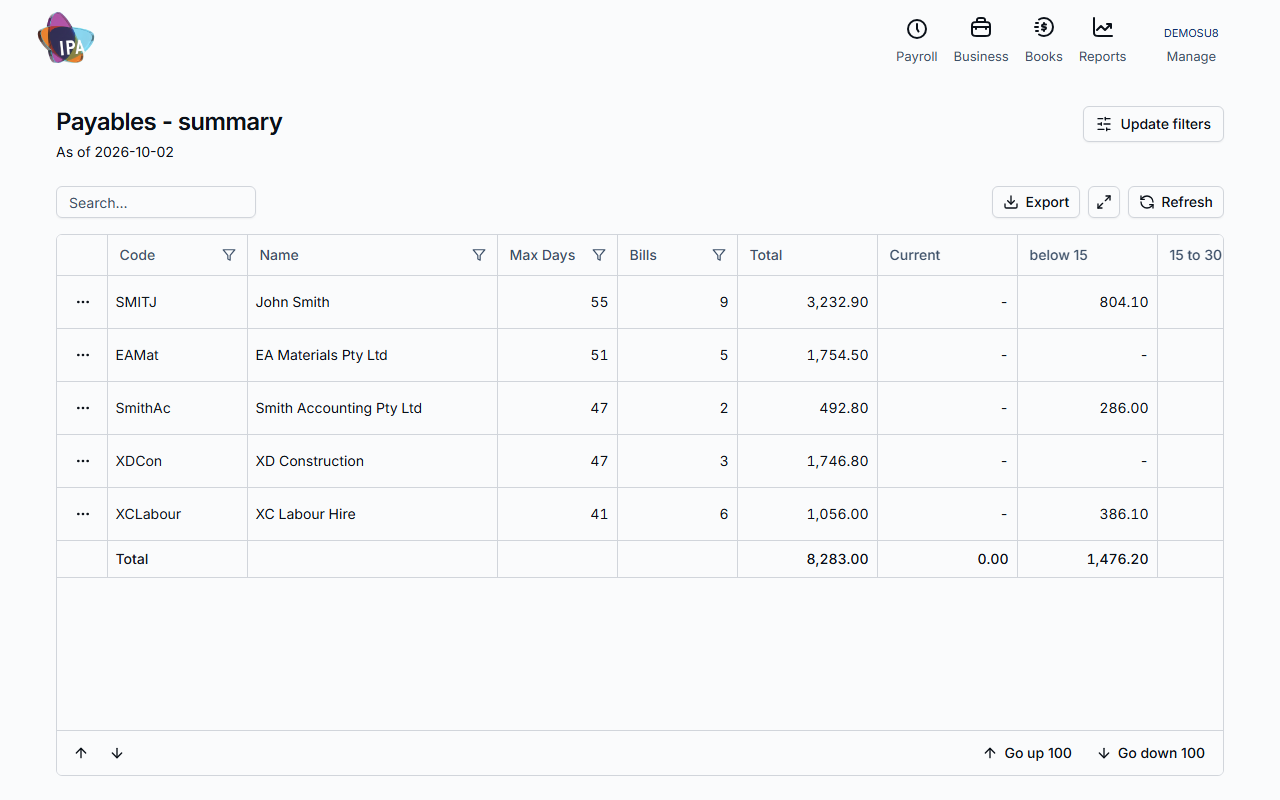
2. Read it
One row per supplier: Bills (how many are unpaid), Total, Max Days (the oldest, in days overdue), then Current and the overdue bands below 15, 15 to 30, 31 to 60, 61 to 90 and over 90. The bands use the same day ranges as your receivables.
Client details on a row opens the supplier. Export downloads the report to Excel.
Other bills reports
Bills List lists each bill with net, GST, gross, the amount still due and the last payment date. TPAR - Transactions lists what you paid each supplier, for the Taxable Payments Annual Report.
Related guides
- Find, edit or delete bills
- Pay bills with an ABA file
- Record a bill payment
- See who owes you (receivables)
Checked against Exacc on 2 October 2026. Machine-readable version